Reporting Overview
AndroidNexus provides reporting capabilities to help you understand your device fleet and track changes over time. Access reports by clicking Reporting in the top navigation bar.
The Reporting Page
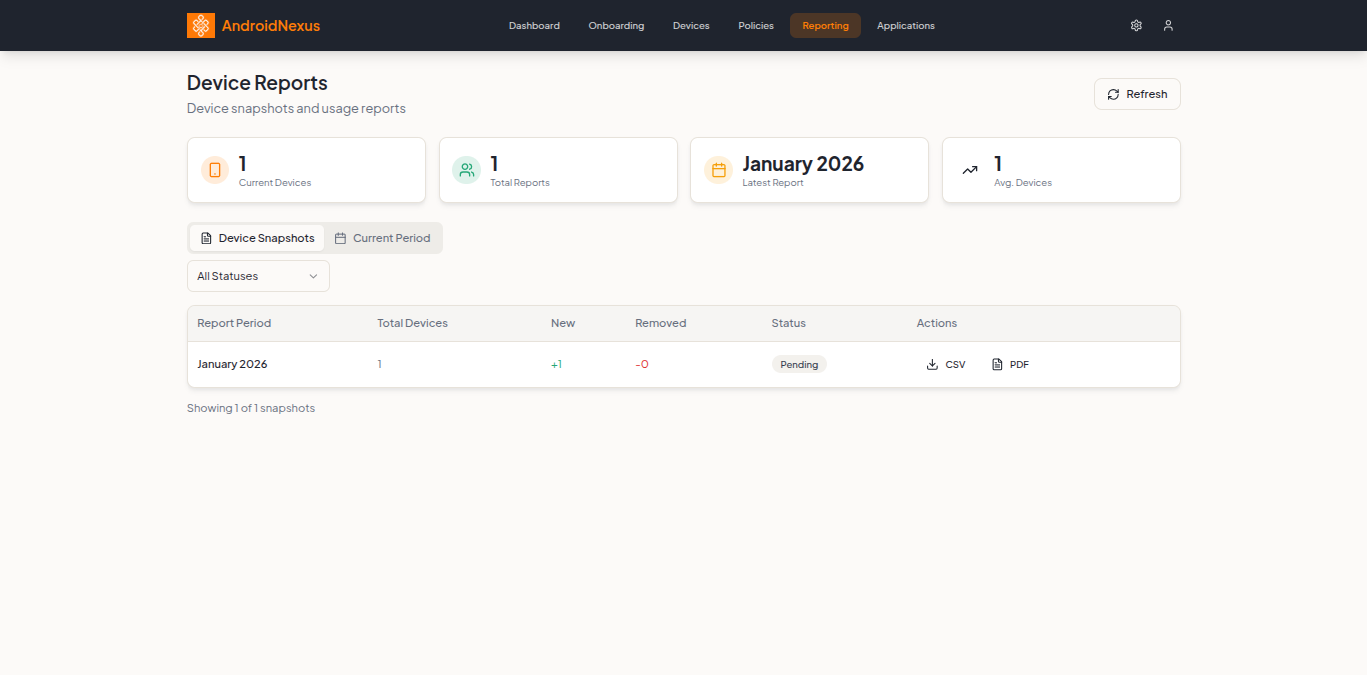
The Reporting page displays device snapshots and usage reports for your organization.
Page Header
| Element | Description |
|---|---|
| Title | "Device Reports" |
| Subtitle | "Device snapshots and usage reports" |
| Refresh | Button to reload report data |
Summary Cards
Four cards at the top provide an overview of your reporting data:
| Card | Description |
|---|---|
| Current Devices | Number of currently enrolled devices |
| Total Reports | Total number of generated report snapshots |
| Latest Report | Date of the most recent report (e.g., "December 2025") |
| Avg. Devices | Average device count across all reports |
Report Tabs
The reporting interface is organized into two tabs:
Device Snapshots Tab
The default view showing historical device snapshots:
Filters
- All Statuses dropdown - Filter by report status
Snapshots Table
| Column | Description |
|---|---|
| Report Period | Month and year (e.g., "January 2026") |
| Total Devices | Number of devices in that period |
| New | Devices added (shown in green, e.g., "+1") |
| Removed | Devices removed (shown in red, e.g., "-0") |
| Status | Report status (Pending, Complete) |
| Actions | Export options |
Export Options
Each report row has export buttons:
| Button | Description |
|---|---|
| CSV | Download report as CSV file |
| Download report as PDF document |
The page shows pagination information: "Showing X of Y snapshots"
Current Period Tab
View real-time data for the current reporting period:
- Live device counts
- Recent enrollments and removals
- Current compliance status
Understanding Device Snapshots
Device snapshots are periodic captures of your fleet status:
What's Captured
Each snapshot records:
- Total enrolled devices at that point in time
- Devices added since last snapshot
- Devices removed since last snapshot
- Device details (name, model, policy, compliance)
Snapshot Generation
Snapshots are generated automatically:
- Monthly snapshots created at the start of each month
- Historical data retained for trend analysis
Using Snapshots
Snapshots help you:
- Track fleet growth or reduction over time
- Identify periods of high device turnover
- Generate historical reports for auditing
- Compare fleet status across different periods
Exporting Reports
CSV Export
Click the CSV button to download a comma-separated file:
- Opens in Excel, Google Sheets, or any spreadsheet application
- Contains all device details for that period
- Useful for data analysis and custom reporting
PDF Export
Click the PDF button to download a formatted document:
- Professional layout suitable for sharing
- Includes summary statistics and device list
- Useful for executive reports and compliance documentation
Dashboard Analytics
In addition to the Reporting page, the main Dashboard provides at-a-glance metrics:
Dashboard Metrics
| Metric | Description |
|---|---|
| Total Devices | All enrolled devices |
| Non-Compliant | Devices with policy violations requiring attention |
| Policies Active | Number of policies in use |
Dashboard Components
- Recent Alerts - Issues requiring your attention
- Quick Actions - Common tasks (Enroll Devices, View Non-Compliant, Create Policy)
- Device Activity - Filter devices by last seen time
- Customize Dashboard - Button to personalize your dashboard layout
Device-Level Reporting
For detailed device information, access individual device reports:
- Go to Devices
- Click on a device
- Explore various tabs for detailed data:
- Telemetry - Device metrics over time
- Usage Analytics - App and device usage patterns
- Event Log - Complete activity history
- Compliance - Policy compliance details
Best Practices
- Export regularly - Download monthly snapshots for your records
- Track trends - Monitor the New/Removed columns for fleet changes
- Review compliance - Check Non-Compliant counts regularly
- Archive reports - Store PDF exports for compliance audits
- Use CSV for analysis - Import into spreadsheets for custom analysis
Common Use Cases
Monthly Fleet Review
- Go to Reporting
- View the latest Device Snapshot
- Check New and Removed counts
- Export PDF for monthly report
Compliance Audit
- Export CSV for the audit period
- Filter for compliance status
- Document any violations and remediation
Growth Tracking
- Compare snapshots across multiple months
- Track Total Devices trend
- Correlate with business initiatives
Next Steps
- Device Management - Manage individual devices
- Policy Configuration - Configure compliance policies
- API Reference - Access reporting data programmatically